Mapping Vertex Scalar Values to Graphs
If required, you can map the scalar values from another object, such as an image or multi-ROI, to a selected graph. For example, to add measurements of pore radii from a distance map.
How to Map Vertex Scalar Values from Another Object to a Graph
- In the Data Properties and Settings panel, right-click the graph that you want the map the vertex scalar values to.
- Choose Map Vertex Scalar Values From in the pop-up menu.
The Choose Scalar Value Slots dialog appears.
- Choose the object — an image or multi-ROI — that includes the scalar values you want to map from in the Object drop-down menu.
- Do one of the following:
- If you are mapping scalar values from a multi-ROI, select the measurement(s) you want to map in the Slot drop-down menu.
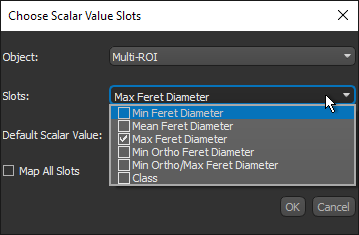
Note Check the Map All Slots option if you want to map all of the available measurements.
- If you mapping scalar values from an image, continue to the next step.
Note In this case, only the values of the image voxels will be mapped to the graph.
- If you are mapping scalar values from a multi-ROI, select the measurement(s) you want to map in the Slot drop-down menu.
- Select a default scalar value, if required.
- Click OK to map the vertex measurement(s) to the selected graph.
The mapped measurement(s) appear in the Vertex radius measurement and Vertex LUT measurement drop-down menus in the Graph settings box.
- Save your changes, if required (see Exporting Objects).
